Ingesting HTTP Events into a Real-Time Lakehouse
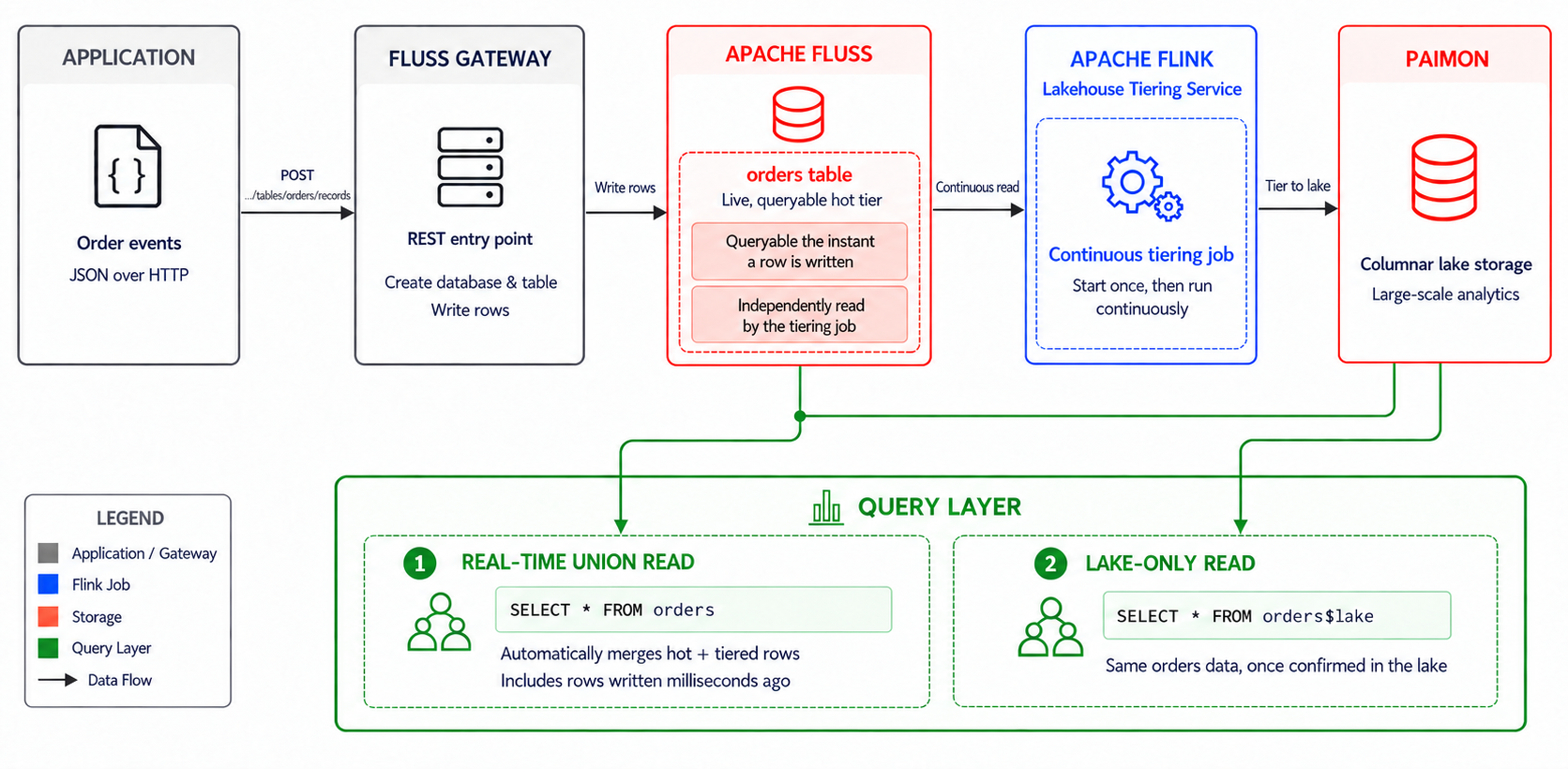
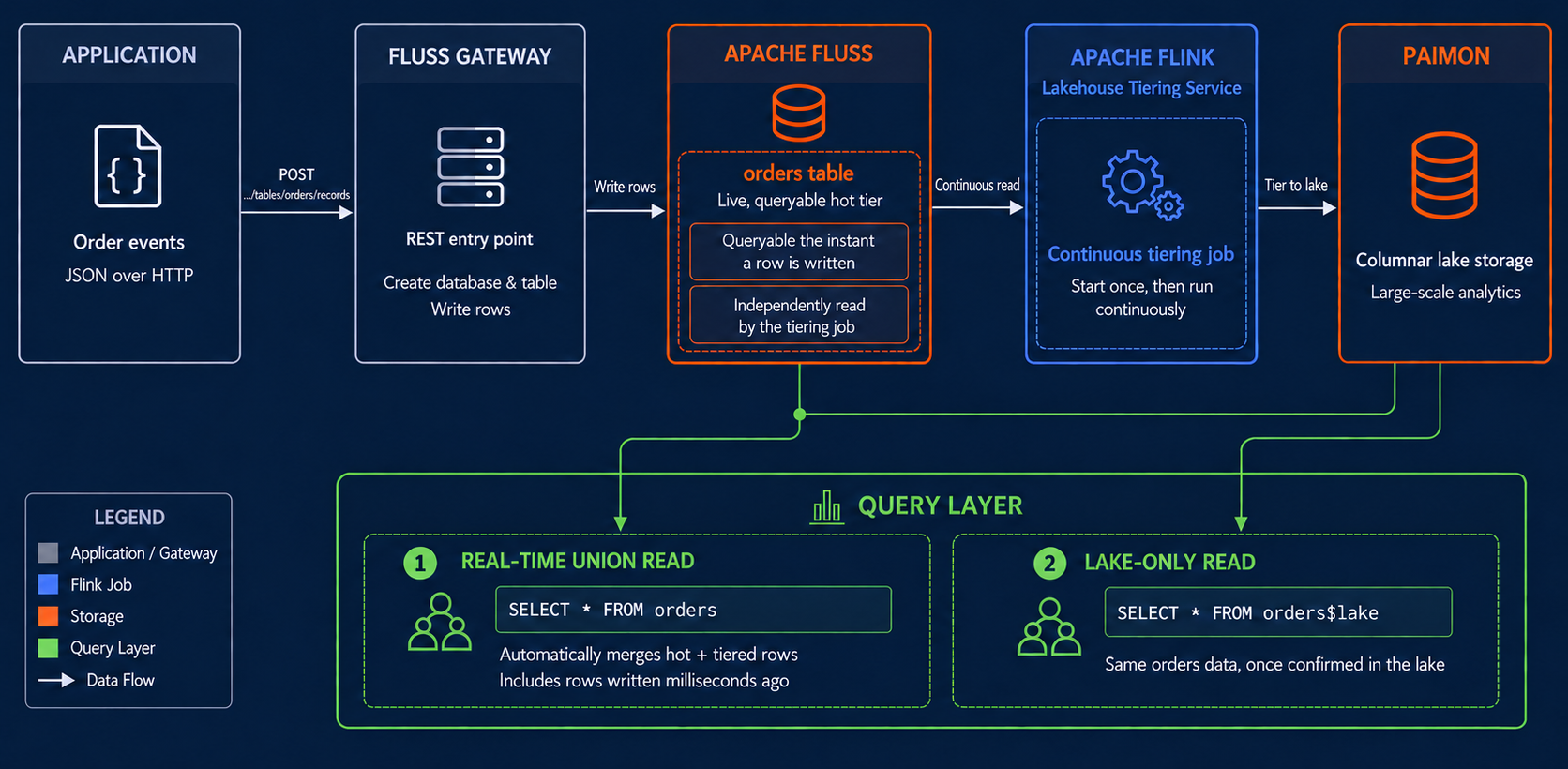
This quickstart shows how an application sends JSON order events to Fluss through the Gateway REST API. Rows are immediately queryable from Fluss and continuously tiered to Paimon by the Lakehouse Tiering Service — without a separate message queue, ingestion job, or Paimon writer.
In this quickstart, you will:
- spin up Fluss, Fluss Gateway, Flink, Paimon, and RustFS with Docker Compose;
- create a lake-enabled table through the Gateway REST API;
- write JSON order records over HTTP;
- read the records back immediately through Flink SQL before any tiering occurs;
- confirm that the rows are continuously tiered into Paimon.
Fluss Gateway is a preview feature introduced in Fluss 1.0.
This quickstart uses its unauthenticated trust mode and is
intended only for local development. See
Fluss Gateway security before planning
a production deployment.
The Gateway does not yet support reading records; this guide reads data back through Flink SQL.
Environment Setup
Prerequisites
Before proceeding with this guide, ensure that Docker and the Docker Compose plugin are installed on your machine.
We encourage you to use a recent version of Docker and Compose v2 (however, Compose v1 might work with a few adaptions).
Starting required components
- Create a working directory for this guide.
mkdir fluss-quickstart-gateway-lakehouse
cd fluss-quickstart-gateway-lakehouse
- Create a
libdirectory and download the Paimon S3 plugin jar required by the Fluss servers:
mkdir lib
curl -fL -o "lib/paimon-s3-2.0.0.jar" \
  "https://repo.maven.apache.org/maven2/org/apache/paimon/paimon-s3/2.0.0/paimon-s3-2.0.0.jar"
The apache/fluss-quickstart-flink image already includes the Flink-side
dependencies used by this guide. Only the Fluss server-side paimon-s3
plugin still needs to be downloaded and mounted into the Fluss containers.
- Create a
docker-compose.ymlfile with the following content:
services:
  #begin RustFS (S3-compatible storage)
  rustfs:
    image: rustfs/rustfs:1.0.0-alpha.83
    ports:
      - "9000:9000"
      - "9001:9001"
    environment:
      - RUSTFS_ACCESS_KEY=rustfsadmin
      - RUSTFS_SECRET_KEY=rustfsadmin
      - RUSTFS_CONSOLE_ENABLE=true
    volumes:
      - rustfs-data:/data
    command: /data
  rustfs-init:
    image: rustfs/rc:v0.1.36
    depends_on:
      - rustfs
    entrypoint: >
      /bin/sh -c "
      until rc alias set rustfs http://rustfs:9000 rustfsadmin rustfsadmin; do
        echo 'Waiting for RustFS...';
        sleep 1;
      done;
      rc mb --ignore-existing rustfs/fluss;
      "
  #end
  coordinator-server:
    image: apache/fluss:1.0.0-rc1
    command: coordinatorServer
    depends_on:
      zookeeper:
        condition: service_started
      rustfs-init:
        condition: service_completed_successfully
    environment:
      - |
        FLUSS_PROPERTIES=
        zookeeper.address: zookeeper:2181
        bind.listeners: FLUSS://coordinator-server:9123
        remote.data.dir: s3://fluss/remote-data
        s3.endpoint: http://rustfs:9000
        s3.access-key: rustfsadmin
        s3.secret-key: rustfsadmin
        s3.region: us-east-1
        s3.path-style-access: true
        s3.assumed.role.arn: arn:aws:iam::000000000000:role/rustfsadmin
        s3.assumed.role.sts.endpoint: http://rustfs:9000
        datalake.enabled: true
        datalake.format: paimon
        datalake.paimon.metastore: filesystem
        datalake.paimon.warehouse: s3://fluss/paimon
        datalake.paimon.s3.endpoint: http://rustfs:9000
        datalake.paimon.s3.access-key: rustfsadmin
        datalake.paimon.s3.secret-key: rustfsadmin
        datalake.paimon.s3.path.style.access: true
    volumes:
      - ./lib/paimon-s3-2.0.0.jar:/opt/fluss/plugins/paimon/paimon-s3-2.0.0.jar
  tablet-server:
    image: apache/fluss:1.0.0-rc1
    command: tabletServer
    depends_on:
      - coordinator-server
    environment:
      - |
        FLUSS_PROPERTIES=
        zookeeper.address: zookeeper:2181
        bind.listeners: FLUSS://tablet-server:9123
        data.dir: /tmp/fluss/data
        remote.data.dir: s3://fluss/remote-data
        s3.endpoint: http://rustfs:9000
        s3.access-key: rustfsadmin
        s3.secret-key: rustfsadmin
        s3.region: us-east-1
        s3.path-style-access: true
        s3.assumed.role.arn: arn:aws:iam::000000000000:role/rustfsadmin
        s3.assumed.role.sts.endpoint: http://rustfs:9000
        datalake.enabled: true
        datalake.format: paimon
        datalake.paimon.metastore: filesystem
        datalake.paimon.warehouse: s3://fluss/paimon
        datalake.paimon.s3.endpoint: http://rustfs:9000
        datalake.paimon.s3.access-key: rustfsadmin
        datalake.paimon.s3.secret-key: rustfsadmin
        datalake.paimon.s3.path.style.access: true
    volumes:
      - ./lib/paimon-s3-2.0.0.jar:/opt/fluss/plugins/paimon/paimon-s3-2.0.0.jar
  zookeeper:
    restart: always
    image: zookeeper:3.9.2
  #begin Fluss Gateway
  gateway:
    image: apache/fluss-gateway:1.0.0-rc1
    depends_on:
      - coordinator-server
    ports:
      - "8080:8080"
    environment:
      - FLUSS_GATEWAY__CLUSTER__DEFAULT__BOOTSTRAP__SERVERS=coordinator-server:9123
  #end
  jobmanager:
    image: apache/fluss-quickstart-flink:1.20-1.0.0-rc1
    ports:
      - "8083:8081"
    entrypoint: ["/opt/flink/init_paimon.sh"]
    command: ["jobmanager"]
    environment:
      - |
        FLINK_PROPERTIES=
        jobmanager.rpc.address: jobmanager
  taskmanager:
    image: apache/fluss-quickstart-flink:1.20-1.0.0-rc1
    depends_on:
      - jobmanager
    entrypoint: ["/opt/flink/init_paimon.sh"]
    command: ["taskmanager"]
    environment:
      - |
        FLINK_PROPERTIES=
        jobmanager.rpc.address: jobmanager
        taskmanager.numberOfTaskSlots: 10
        taskmanager.memory.process.size: 2048m
        taskmanager.memory.task.off-heap.size: 128m
  sql-client:
    image: apache/fluss-quickstart-flink:1.20-1.0.0-rc1
    depends_on:
      - jobmanager
    entrypoint: ["/opt/flink/init_paimon.sh"]
    command: ["/opt/sql-client/sql-client"]
    environment:
      - |
        FLINK_PROPERTIES=
        jobmanager.rpc.address: jobmanager
        rest.address: jobmanager

volumes:
  rustfs-data:
The Docker Compose environment consists of the following containers:
- Fluss Cluster: a Fluss
CoordinatorServer, a FlussTabletServerand aZooKeeperserver. - Fluss Gateway: a stateless REST service used to create tables and
write records in this guide, listening on
localhost:8080. - Flink Cluster: a Flink
JobManager, a FlinkTaskManager, and a Flink SQL client container, used to run the Lakehouse Tiering Service and query results. - RustFS: an S3-compatible storage system used both as Fluss remote storage and Paimon's filesystem warehouse.
- Start all containers.
docker compose up -d
docker compose ps
The sql-client service may exit after docker compose up -d because no
interactive terminal is attached. This is expected. You will start a new SQL
client container with docker compose run --rm sql-client later in this guide.
- Wait until the Gateway can reach Fluss:
until curl -fsS \
  http://localhost:8080/v1/clusters/default/databases >/dev/null; do
  sleep 2
done
All the following commands involving docker compose should be executed in the
working directory that contains the docker-compose.yml file.
Congratulations, you are all set!
Create a datalake-enabled table via the Gateway
Set the endpoint and resource names used in the examples:
GATEWAY_URL=http://localhost:8080
CLUSTER=default
DATABASE=gateway_demo
Create a database
curl -sS --fail-with-body -X POST \
  -H 'Content-Type: application/json' \
  "$GATEWAY_URL/v1/clusters/$CLUSTER/databases" \
  -d "{\"database\":\"$DATABASE\"}"
Create the table with lakehouse integration enabled
Set table.datalake.enabled and table.datalake.freshness in configs at
creation time — the same properties the lakehouse.md guide sets via
WITH (...) in Flink SQL:
curl -sS --fail-with-body -X POST \
  -H 'Content-Type: application/json' \
  "$GATEWAY_URL/v1/clusters/$CLUSTER/databases/$DATABASE/tables" \
  -d '{
    "table_name": "orders",
    "columns": [
      {"name": "order_id", "data_type": {"type": "INTEGER"}, "nullable": false},
      {"name": "customer", "data_type": {"type": "STRING"}, "nullable": true},
      {"name": "amount_cents", "data_type": {"type": "BIGINT"}, "nullable": true},
      {"name": "status", "data_type": {"type": "STRING"}, "nullable": true}
    ],
    "primary_key": ["order_id"],
    "distribution": {"bucket_count": 1, "bucket_keys": ["order_id"]},
    "configs": {
      "table.datalake.enabled": "true",
      "table.datalake.freshness": "30s"
    }
  }'
amount_cents stores the order amount as an integer number of cents, to
keep the HTTP payload simple.
Write records
curl -sS --fail-with-body -X POST \
  -H 'Content-Type: application/json' \
  "$GATEWAY_URL/v1/clusters/$CLUSTER/databases/$DATABASE/tables/orders/records" \
  -d '{
    "entries": [
      {"id": "order-1", "upsert": {"order_id": 1, "customer": "Alice", "amount_cents": 4599, "status": "placed"}},
      {"id": "order-2", "upsert": {"order_id": 2, "customer": "Bob", "amount_cents": 12000, "status": "placed"}},
      {"id": "order-3", "upsert": {"order_id": 3, "customer": "Carol", "amount_cents": 750, "status": "placed"}}
    ]
  }'
amount_cents values fit comfortably in a JSON number here. For BIGINT
or DECIMAL values that exceed JSON number precision (values beyond 2^53),
pass them as base-10 strings instead — e.g. "amount_cents": "9999999999999999".
A successful response looks like:
{
  "row_count": 3,
  "success_count": 3,
  "error_count": 0,
  "successes": [{"id": "order-1"}, {"id": "order-2"}, {"id": "order-3"}],
  "failures": []
}
Query Immediately
Open the Flink SQL client:
docker compose run --rm sql-client
Create the Fluss catalog and switch to it:
CREATE CATALOG fluss_catalog WITH (
    'type' = 'fluss',
    'bootstrap.servers' = 'coordinator-server:9123',
    'paimon.s3.access-key' = 'rustfsadmin',
    'paimon.s3.secret-key' = 'rustfsadmin'
);
USE CATALOG fluss_catalog;
USE gateway_demo;
SET 'sql-client.execution.result-mode' = 'tableau';
SET 'execution.runtime-mode' = 'batch';
Query the table immediately after writing – no need to wait for tiering:
SELECT order_id, customer, amount_cents, status FROM orders;
The result includes all three orders even though Paimon has not committed its first snapshot yet. Union Read gets the newest rows directly from Fluss and combines them with any data already tiered:
+----------+----------+---------------+---------+
| order_id | customer | amount_cents  | status  |
+----------+----------+---------------+---------+
|        1 |    Alice |          4599 | placed  |
|        2 |      Bob |         12000 | placed  |
|        3 |    Carol |           750 | placed  |
+----------+----------+---------------+---------+
Start the Lakehouse Tiering Service
Keep the SQL client open. In another terminal, change to the directory
containing docker-compose.yml and submit the Lakehouse Tiering Service
as a detached Flink job:
docker compose exec jobmanager \
    /opt/flink/bin/flink run -d \
    /opt/flink/opt/fluss-flink-tiering-1.0.0.jar \
    --fluss.bootstrap.servers coordinator-server:9123 \
    --datalake.format paimon \
    --datalake.paimon.metastore filesystem \
    --datalake.paimon.warehouse s3://fluss/paimon \
    --datalake.paimon.s3.endpoint http://rustfs:9000 \
    --datalake.paimon.s3.access.key rustfsadmin \
    --datalake.paimon.s3.secret.key rustfsadmin \
    --datalake.paimon.s3.path.style.access true
The Flink Web UI should show one running tiering job.
Verify Data in Paimon
Return to the SQL client opened earlier. After approximately 30 seconds, inspect the Paimon snapshots:
SELECT snapshot_id, total_record_count
FROM orders$lake$snapshots
ORDER BY snapshot_id;
Then check the lake row count:
SELECT COUNT(*) AS lake_rows FROM orders$lake;
The count becomes 3 after the tiering cycle commits the rows.
To see the difference between the two query forms, write one more record through the Gateway from another terminal. If you're in a fresh terminal, re-set the same variables used earlier:
GATEWAY_URL=http://localhost:8080
CLUSTER=default
DATABASE=gateway_demo
and then continue with:
curl -sS --fail-with-body -X POST \
  -H 'Content-Type: application/json' \
  "$GATEWAY_URL/v1/clusters/$CLUSTER/databases/$DATABASE/tables/orders/records" \
  -d '{"entries": [{"id": "order-4", "upsert": {"order_id": 4, "customer": "Dave", "amount_cents": 2200, "status": "placed"}}]}'
Re-run SELECT ... FROM orders in the SQL client – order_id 4 appears
immediately in the unified view. The lake-only view, orders$lake, will
reflect it once the tiering service has processed it.
The two query forms serve different purposes:
| Query | Data read | Expected freshness |
|---|---|---|
SELECT ... FROM orders | Fluss hot data + latest Paimon snapshot | Sub-second |
SELECT ... FROM orders$lake | Paimon only | ~30s tiering window |
Quitting the SQL Client
exit;
What This Quickstart Demonstrates
The application only makes HTTP requests to the Gateway — no message queue or producer, no dedicated Flink ingestion job, no Paimon writer, and no separate table definitions for the streaming and lake layers. The Lakehouse Tiering Service does run on Flink, but as shared infrastructure serving all lake-enabled Fluss tables, not as code the application owns or operates.
Preview limitations
- The Gateway's 1.0 preview only implements
trustmode security — it does not authenticate callers or terminate TLS. Don't expose$GATEWAY_URLdirectly in production; put it behind an authenticated, TLS-terminating ingress. - The Gateway does not support record reads, primary-key/prefix lookups, or log scans — this is why the guide reads back through Flink SQL.
- HTTP 200 from a write request can still contain partial failures; always
check both
successesandfailuresin the response body.
See the full Fluss Gateway reference for details.
Clean up
Exit the SQL client, then delete the table and database through the Gateway, then stop the containers:
curl -sS --fail-with-body -X DELETE \
  "$GATEWAY_URL/v1/clusters/$CLUSTER/databases/$DATABASE/tables/orders"
curl -sS --fail-with-body -X DELETE \
  "$GATEWAY_URL/v1/clusters/$CLUSTER/databases/$DATABASE"
docker compose down -v
Learn more
Now that you're up and running with the Fluss Gateway and a real-time lakehouse, check out the Fluss Gateway reference for the full REST API, or the Streaming Lakehouse guide for the equivalent all-Flink-SQL workflow.