Data Retention and TTL
Fluss provides three retention mechanisms, which can be configured together:
| Mechanism | What expires | Main configuration |
|---|---|---|
| Log Retention | Data logs in log tables; changelogs in primary key tables | table.log.ttl |
| KV Retention | Individual rows in a primary key table's KV store | table.kv.ttl |
| Partition Retention | Entire time partitions in log tables or primary key tables | table.auto-partition.* |
For example, a primary key table can keep its current rows while retaining only one day of changelog. Expiration is asynchronous, so a TTL is not an exact deadline for data removal or disk-space reclamation.
Log Retention
Table Log TTL
Set table.log.ttl to control how long logs are retained. The default is 7 days; 0ms disables
expiration based on this TTL.
- For log tables, this controls the retention of table data.
- For primary key tables, this controls changelog history available to consumers. Current KV rows remain governed by KV Retention.
Local Log TTL
With remote log storage enabled (the default), local and remote storage serve different purposes:
- Local storage is the hot tier for recent data. It serves low-latency tail reads and, with the default Apache Arrow log format, supports column pruning so streaming consumers read only the columns they need.
- Remote storage is the cold tier that keeps older logs readable within the configured log retention period, even after their local copies are removed. It supports historical replay and consumers catching up beyond the local window. Remote log reads typically have more network bandwidth available and do not affect the Fluss cluster's online read and write traffic.
Size local retention to cover the data your tailing consumers need: their expected maximum lag, plus time for restarts and catching up after backpressure, with some headroom. Size remote retention for how far back consumers need to replay data. This keeps the hot working set local while using remote storage for longer history.
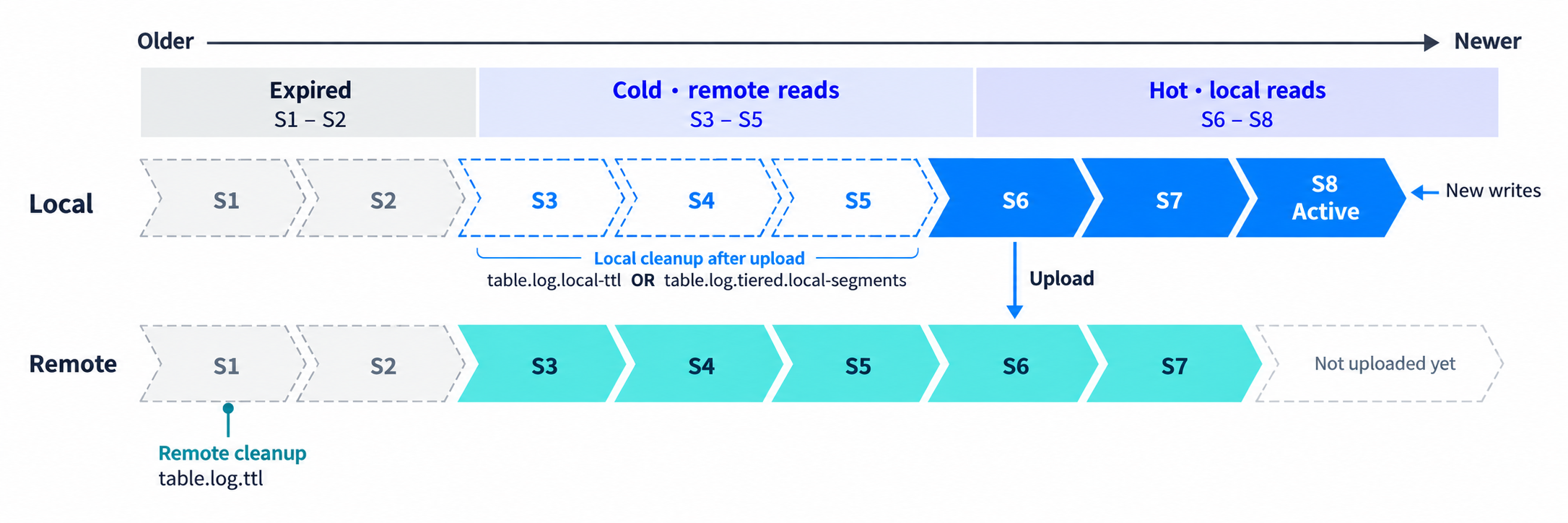
The following options control the two tiers:
| Option | Default | Effect |
|---|---|---|
table.log.ttl | 7 d | Controls remote log retention. |
table.log.local-ttl | Inherits table.log.ttl | Controls TTL-based cleanup of local copies. 0ms disables this cleanup policy. |
table.log.tiered.local-segments | 2 | Controls how many recent local log segments the count-based cleanup policy retains. Must be greater than 0. |
When both TTLs are positive, table.log.local-ttl must not exceed table.log.ttl. Local copies
can be removed when either the local TTL or segment-count limit is reached, after they have
been copied remotely. Setting local TTL to 0ms leaves count-based cleanup enabled.
For example, if consumers normally lag by at most 30 minutes and need an additional hour for
restarts and catching up, table.log.local-ttl = '2 h' is a starting point with some headroom.
Set table.log.ttl = '7 d' if consumers need seven days of replay history. Also size
table.log.tiered.local-segments to cover that two-hour hot window at peak write rates, accounting
for how frequently segments roll in each bucket. The default of two segments does not guarantee
two hours of local data: the segment-count policy may remove local copies before the local TTL
expires. Reads beyond the remaining local window access remote storage.
All three table options support ALTER TABLE ... SET and ALTER TABLE ... RESET.
See Updating Configs.
Active-segment Rolling
For low-traffic tables, enable the server option log.retention.roll-active-segment.enabled to
allow expired active logs to become eligible for upload and cleanup even when no new data arrives.
It is disabled by default and supports
dynamic cluster updates.
The expiration time follows the effective local log TTL described above.
When upgrading from v0.9, keep this option disabled until every CoordinatorServer and TabletServer has been upgraded to v1.0 and the upgrade is complete. Then enable it dynamically as described in the 1.0 Upgrade Notes.
KV Retention
Row TTL for Primary Key Tables
Configure row TTL when creating a primary key table:
| Option | Default | Effect |
|---|---|---|
table.kv.ttl | Disabled when unset | Expires individual KV rows. Must be at least 1 millisecond when configured. |
table.kv.ttl.time-column | Unset; uses processing time | Uses the specified column's event time to determine row expiration. Requires table.kv.ttl. |
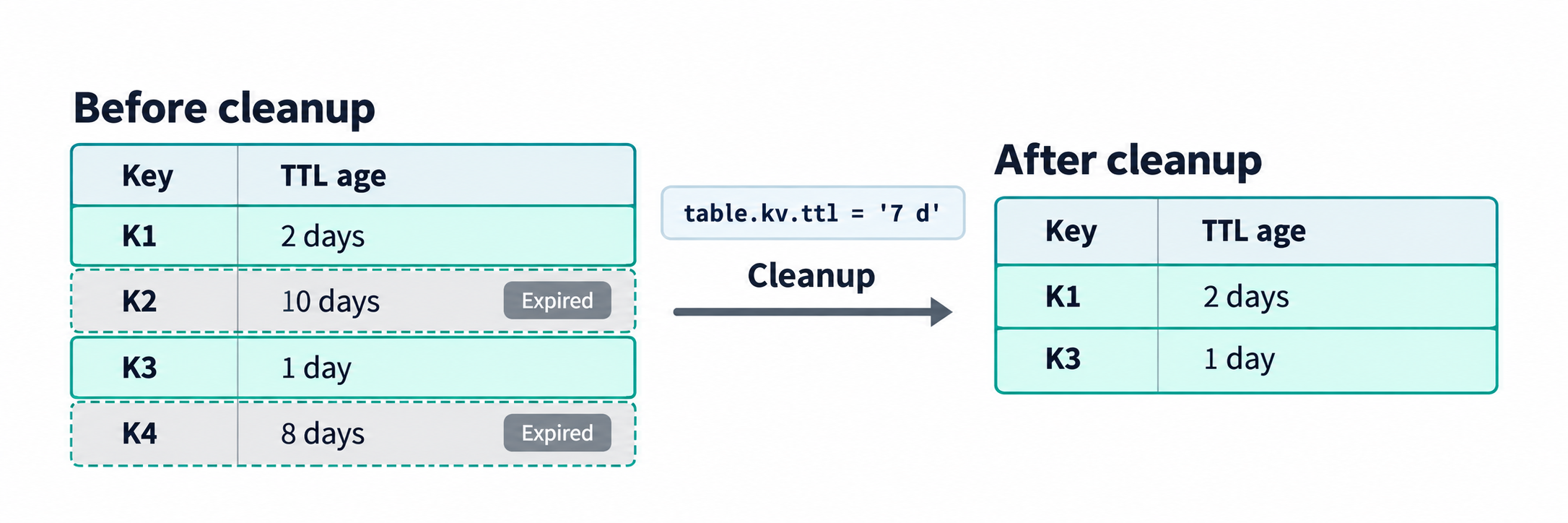
For example, this table expires rows after seven days by event time and retains one day of changelog:
CREATE TABLE pk_table
(
    id BIGINT,
    event_time BIGINT,
    name STRING,
    PRIMARY KEY (id) NOT ENFORCED
) WITH (
    'bucket.num' = '4',
    'table.kv.ttl' = '7 d',
    'table.kv.ttl.time-column' = 'event_time',
    'table.log.ttl' = '1 d'
);
Omit table.kv.ttl.time-column to use processing time. For event time, the column must be BIGINT
epoch milliseconds, TIMESTAMP, or TIMESTAMP_LTZ. TIMESTAMP uses the TabletServer's system
time zone, which must be consistent across servers. Rows with null event-time values do not expire
through row TTL.
Keep these effects and restrictions in mind:
- Expired rows may remain queryable until background cleanup runs.
- KV TTL cleanup does not emit DELETE records to changelogs. So
$changelog/$binlogvirtual tables and changelog consumers can't observe theDELETEevent for the TTL cleaned rows. After a row is cleaned up, writing the same key is treated as an insert. - Both options must be configured at table creation; changing or resetting them is unsupported yet.
- Upgrade all servers to Fluss 1.0+ before creating a KV-TTL table. Downgrading below 1.0 after such a table exists is unsupported.
Existing remote snapshot files have separate retention, controlled by
kv.snapshot.num-retained.
Partition Retention
Use auto partitioning when data should expire in whole time partitions. It applies to both log tables and primary key tables.
Enable it with table.auto-partition.enabled = 'true' (default: false), then configure:
| Option | Default | Effect |
|---|---|---|
table.auto-partition.time-unit | DAY | Sets the calendar unit for partition creation and expiration. |
table.auto-partition.num-retention | 7 | Retains this many historical time units before the current unit. Older partitions expire. |
table.auto-partition.num-precreate | 2 | Pre-creates this many partitions, including the current one. Does not extend retention. |
table.auto-partition.time-zone | System time zone | Sets the time zone for calendar boundaries. |
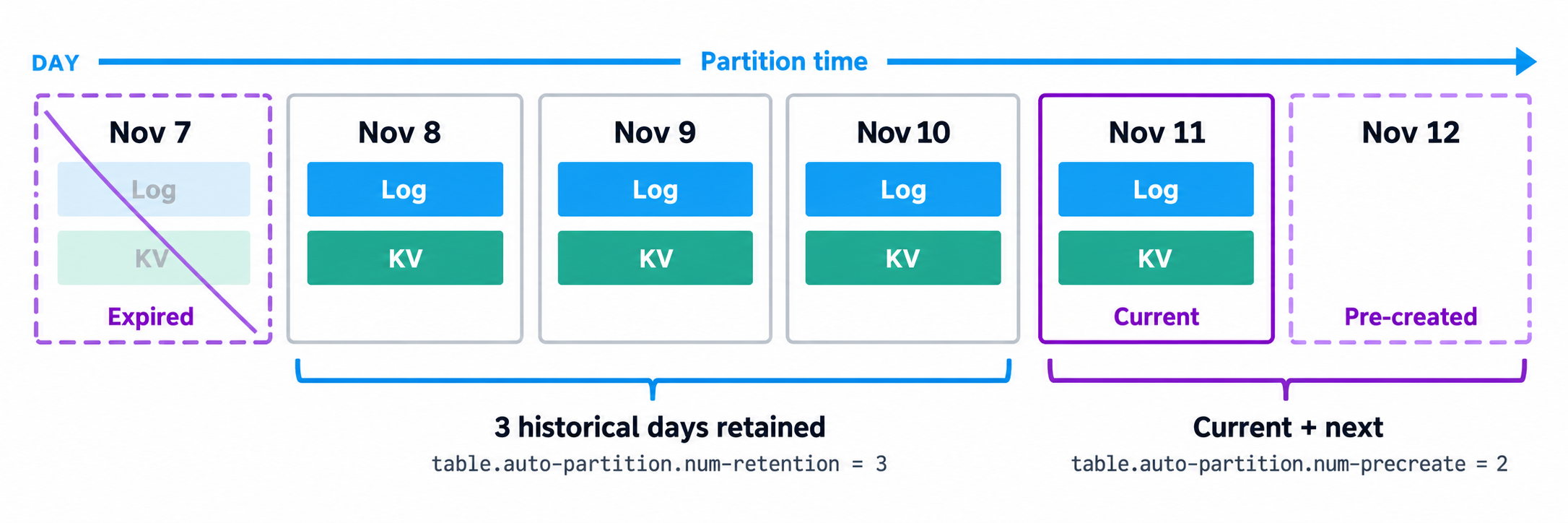
For daily partitions with num-retention = '3', on November 11 the retained historical partitions
are November 8–10, in addition to the current partition on November 11. The default pre-creation
count also creates November 12. Writing new rows into an older partition does not extend its retention.
Log and KV TTLs can expire data inside a retained partition. Longer log or KV TTLs do not prevent
the partition itself from expiring. The retention and pre-creation counts support
ALTER TABLE ... SET and ALTER TABLE ... RESET. See Partitioning for complete
examples and multi-field partition rules.
For lakehouse tables, data already tiered into the lake can remain accessible through Union Read after Fluss logs or partitions expire, see Lakehouse Data Retention.
See Flink Connector Options and Server Configuration for complete configuration references.